Know What to Buy
Before You Buy It.
SupplyWatch turns your Shopify sales and inventory data into clear purchasing recommendations — what to order, when to order it, and how much.
45 days free·$199/month thereafter
Protein Powder 1 kg
Chocolate · SKU PP1-CHOC
What to buy. When to buy. How much.
One number per SKU — computed from sales, inventory, seasonality, bundles, variants and supplier lead times.
What to Buy
Every SKU that will run out inside your lead time — surfaced automatically.
When to Buy
Timed to your supplier lead time so replenishment lands before you sell out.
How Much to Buy
Coverage math that reads velocity, seasonality, bundles and open POs — no guesswork.
Four hours of spreadsheets → four minutes of decisions.
- Export CSV, eyeball 90 days per SKU
- Forget the 21-day supplier lead time
- Miss bundles, order the hero, not the component
- Send the PO and hope
- Reorder ranked by urgency, ready to act
- Velocity + lead time + seasonal, per variant
- Bundle components attributed automatically
- One click, PO out the door
Every owner is asking the same four questions.
You are here because at least one of them is keeping you up at night.
What should I buy next?
The exact SKUs to reorder this week — quantities timed to your supplier lead time.
Am I buying too much?
Slow-moving stock, excess coverage and cash trapped — surfaced before you write the next PO.
Can I trust my inventory?
Bundles, kits, variants and multi-location stock reconciled against live Shopify.
Can I still manage this manually?
Growing SKUs, suppliers and complexity — kept under control from one screen.
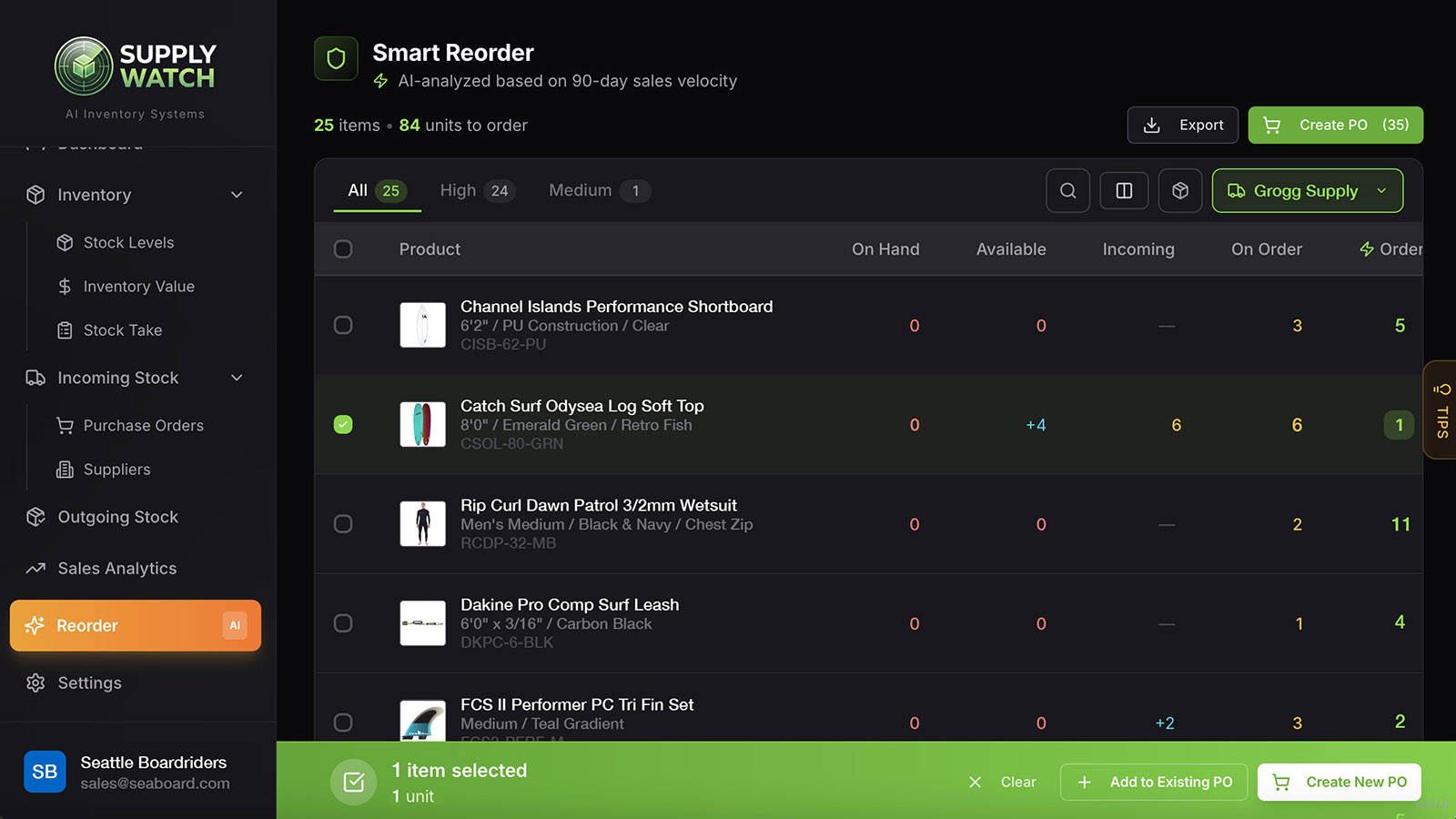
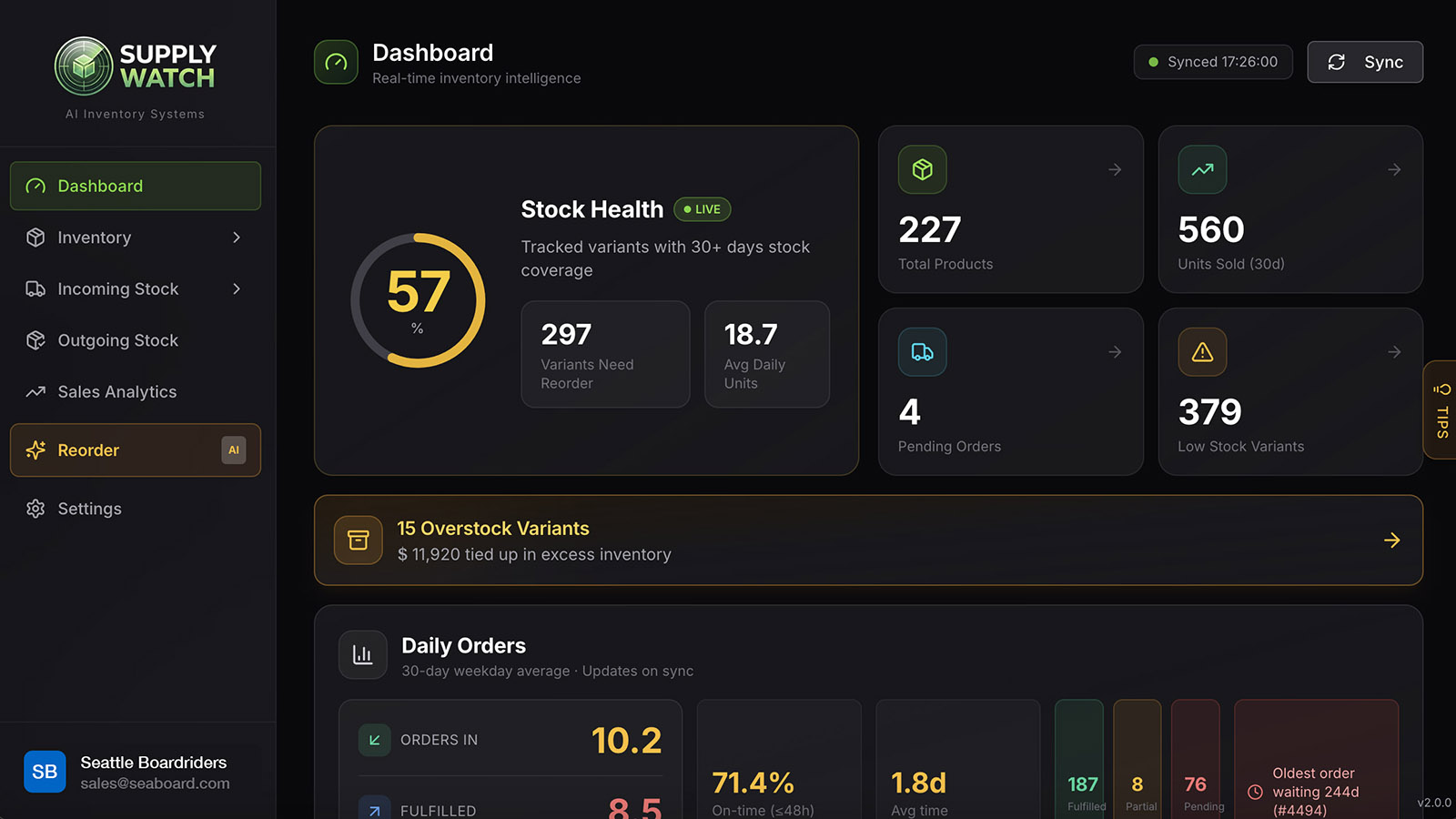
Here are the products needing attention.
Here is what we recommend you order.
This is the screen most SupplyWatch merchants open on Monday morning.

How much cash is trapped in your stock?
Every unit on the shelf is working capital you have already spent. Overstock and dead stock quietly tie up cash you could be using to restock bestsellers — the classic cash-flow trap for growing Shopify stores. SupplyWatch shows exactly how much cash is tied up in slow-moving and excess inventory, and what to reorder instead so your money keeps moving.
- Inventory value / cash tied upThe total working capital locked in stock right now — valued by variant and location so you can see where your money actually sits.
- Dead stock & slow-moving inventorySKUs carrying weeks or months of excess coverage — trapped cash that could restock a bestseller instead of gathering dust.
- Overstock & carrying costWhere you have over-ordered, plus what to buy this week ranked by urgency and supplier lead time — free the cash, keep the shelves right.
Free up the cash tied up in dead stock — and put it into inventory that actually sells.
Selling bundles, kits or variants?
Purchasing gets that much harder.
SupplyWatch decomposes every bundle into components. When a bundle sells, each component is attributed. Reorders cover the bottleneck component — not just the hero SKU.
- Auto component detection for kits, sets and variant combos — no manual mapping.
- Bundle sales attributed to every component so velocity reflects real demand.
- Reorder to unlock the bundle, not just the bestseller inside it.
Can you trust your inventory numbers?
If your inventory data is wrong, how can you know what to buy? Every reorder, every purchase order, every “are we about to run out?” depends on one thing: accurate stock counts. SupplyWatch keeps your inventory accurate in real time and reconciles every stock movement — so purchasing decisions rest on numbers you can trust, not a spreadsheet that drifted three weeks ago.
- Real-time inventory tracking — live Shopify sync over official webhooks. Fulfil, receive or adjust and your stock count updates instantly. No overnight batch, no stale numbers.
- Inventory reconciliation you can audit — a ledger-based timeline logs every sale, PO receipt, stock-take and manual adjustment as a dated event. One source of truth across your entire catalogue.
- Catch shrinkage & stock discrepancies — cycle counts and stock-takes surface miscounts, shrinkage and drift, then correct them before a wrong number skews your next purchase order.
Accurate inventory in, smart purchasing out. Wrong numbers make every buying decision a guess.
From install to your first PO in minutes.
No CSV imports. No manual mapping. Just install and read the recommendations.
Install App
One click from the Shopify App Store — no card required.
Auto-Sync
Products, orders, inventory and locations import automatically.
See Recommendations
Your first purchasing recommendations render inside 2 minutes.
Order With Confidence
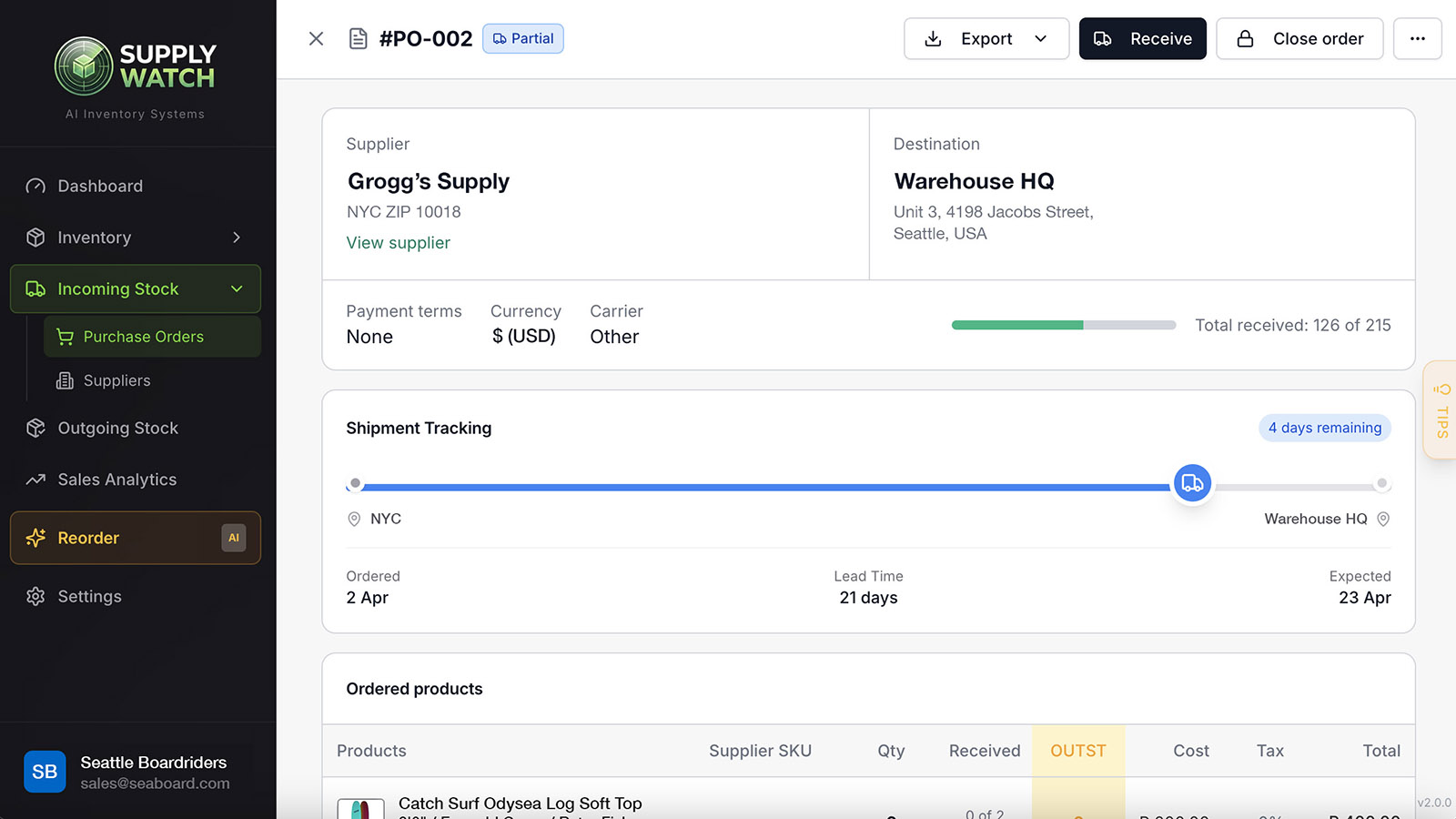
Turn each recommendation into a PO. Track it through receiving.
The AI engine behind every purchasing recommendation.
Every quantity has a receipt. Hover any suggestion in-app and see the full math.
Adaptive Velocity Forecasting
Every SKU gets its own responsive + stable velocity blend — so a real trend reacts fast, and lumpy sellers stay steady.
Bundle-Aware Purchasing
Recommendations reflect true component stock, not just the parent SKU. Kits, variants and combos all reconcile.
Lead-Time-Correct Timing
Coverage math built from your supplier lead times so replenishment lands before you run out — not after.
Seasonal & Safety Coverage
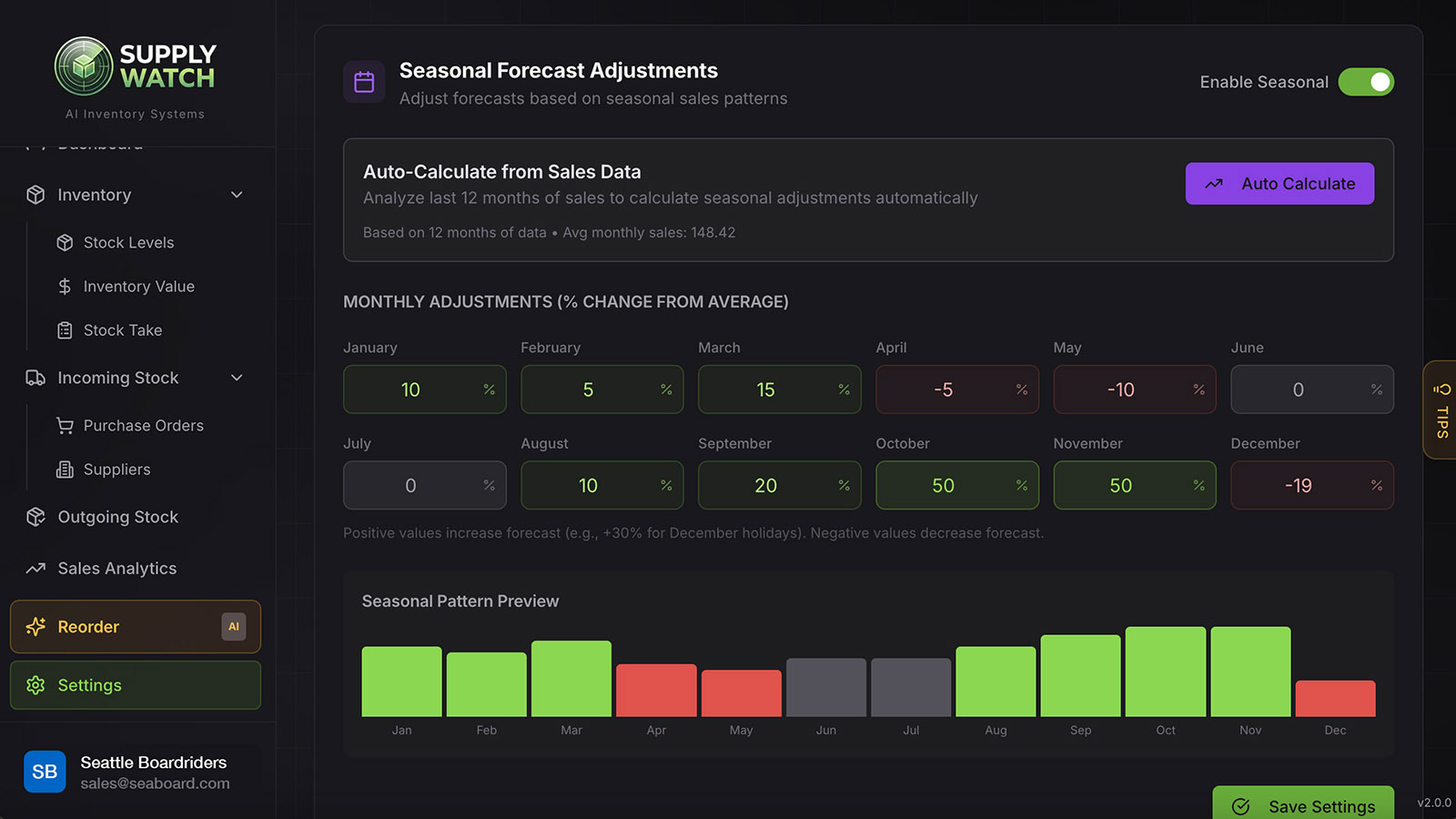
95% service level safety stock, month-aware seasonal spread, unfulfilled orders, open POs — all in one qty.
One-Click Purchase Orders
Turn any recommendation into a supplier PO. Track it through receiving. Reconcile stock automatically.
Shrinkage Reports from Stock Take
Monthly stock-take reconciliation catches shrinkage before it eats your margin — variance flagged by SKU and location.
Read-Only, Zero-Code Install
No storefront scripts, no theme edits. SupplyWatch reads your Shopify data — your site stays fast and clean.
Built for Growing Shopify Stores.
50+ SKUs, real inventory, purchasing that's outgrown your spreadsheet — that's who this is for.
Try SupplyWatch free for 45 days.
See what you should reorder before you pay.
One flat plan with everything included. No feature gates, no seat limits, no per-SKU caps.
Professional
Billed monthly. Cancel anytime.
- Purchasing recommendations — what, when, how much
- Bundle-aware component tracking (auto)
- Adaptive velocity + seasonal forecasting
- One-click purchase orders + receiving
- Multi-location stock reconciliation
- Live Shopify sync (read-only, no code)
- Unlimited SKUs, orders and team seats
- Cash-position & overstock reporting
No credit card required to start
One plan.
Everything included.
We don't nickel-and-dime with Starter, Growth and Enterprise tiers. Every merchant gets the full engine — forecasts, bundles, reorder, purchase orders, safety stock, multi-location, unlimited team seats. Because it's all valuable, and picking & choosing costs you sales.
- Full engine, day one. No feature gates. The stockout you prevent in week two pays the year.
- 45 days to prove it. Longer than any inventory app on the App Store. If it doesn't earn its keep by week 6, walk — no card, no charge.
- Priced like a teammate, not per SKU, per user, or per order. $199 flat, forever, however big you grow.
- 3–4 pricing tiers
- Forecasting behind paywall
- 14-day trial, card required
- Per-SKU / per-order caps
- One flat plan
- Everything included
- 45-day trial, no card
- Unlimited SKUs & orders
Confident enough to give you 45 days. Fair enough to charge one price.
Built for Shopify. Safe by design.
Shopify Partner app · read-only access · zero code on your storefront.
What merchants ask before installing.
Straight answers about the trial, the math and the fit.
Know what to buy.
Before you buy it.
45 days of full access. Every SKU, every recommendation, every purchase order — free to use before you decide.
No credit card. No code on your store. Cancel anytime.
No credit card required · 2-minute setup · Cancel anytime